Thomson Plaza Website Hacked in 2026: Why WordPress Security Failed
Thomson Plaza Website Hacked in 2026: Why WordPress Security Failed
TL;DR: On 5 April 2026, Singaporeans discovered that thomsonplaza.com.sg was serving a Turkish gambling site called Holiganbet to anyone who clicked through from Google Search or Google Maps, while showing the normal mall website to anyone who typed the URL directly. This is a textbook referrer-based cloaking attack. Thomson Plaza's WordPress installation is almost certainly the entry point. This post is a forensic breakdown of exactly how the attack works, why WordPress makes it trivially achievable, what the real business damage looks like, and why it structurally cannot happen to a custom-coded website.
What Exactly Happened to Thomson Plaza's Website?
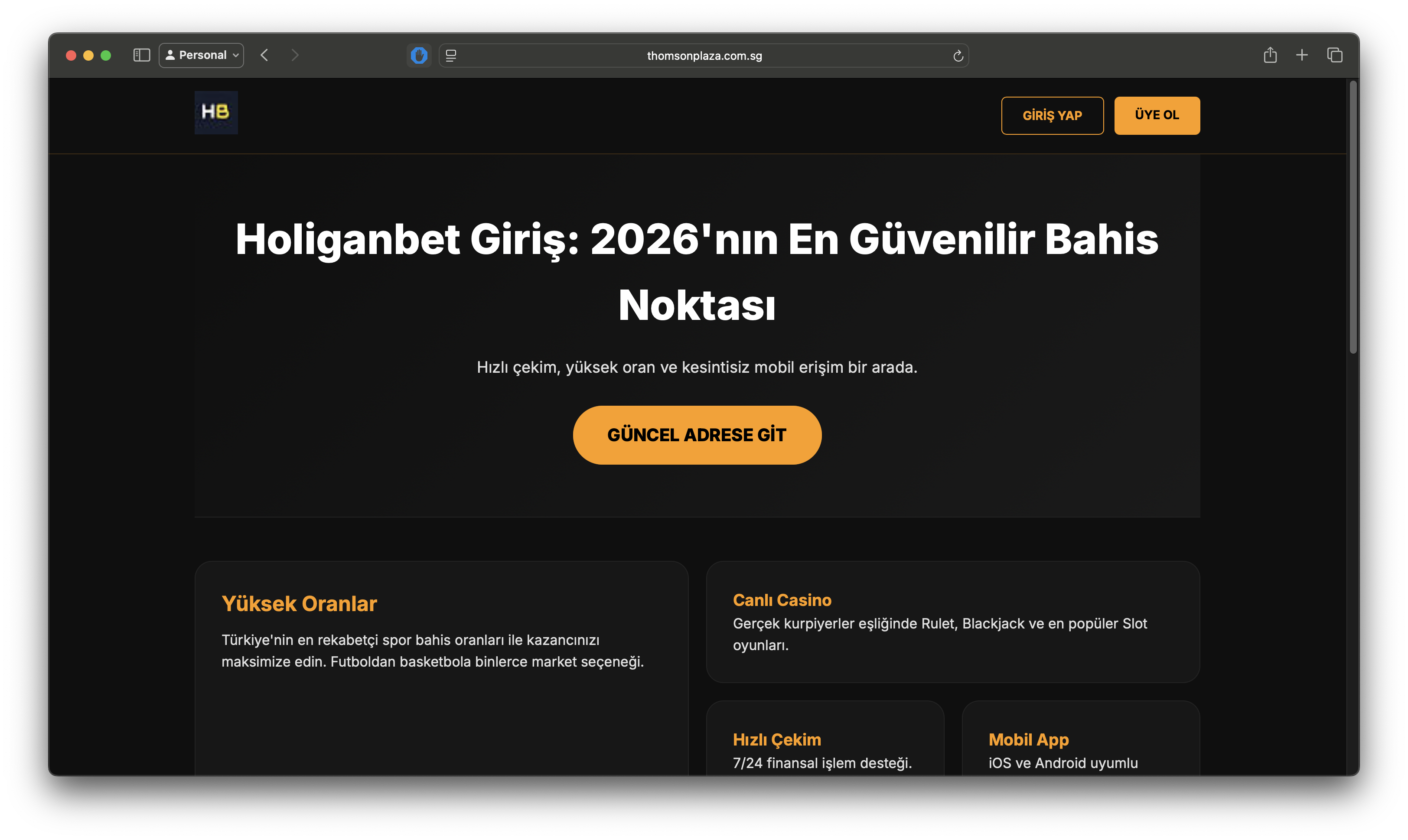
On 5 April 2026, a Reddit user (u/jsyeo) on r/singapore posted that while trying to look up stores at Thomson Plaza, clicking the link in the mall's Google Business Profile redirected them to a foreign gambling site: Holiganbet ("Holiganbet Giriş: 2026'nın En Güvenilir Bahis Noktası", Turkish for "Holiganbet Login: The Most Reliable Betting Point of 2026").
The site that loaded was a fully rendered Turkish-language online gambling platform with betting odds, a live casino section, a mobile app promotion, and payment options. It carried the www.thomsonplaza.com.sg domain in the browser address bar. To an unsuspecting visitor, it would look as if the mall's own website had been replaced with a casino.
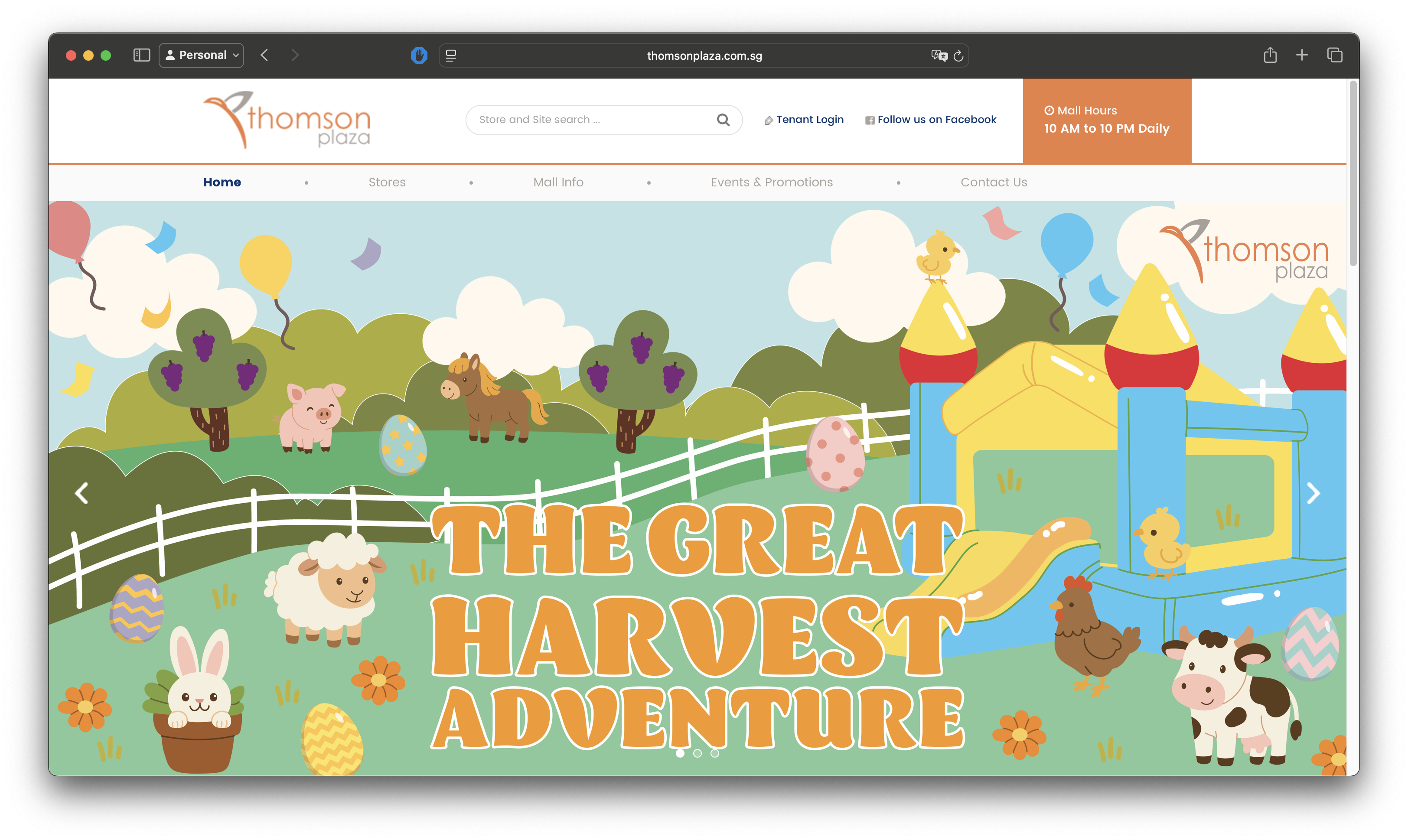
The attack had a particularly sophisticated quality: visiting thomsonplaza.com.sg by typing it directly into a browser showed the legitimate Thomson Plaza shopping mall website. But clicking through from Google Search results, or via the Google Maps / Google Business Profile link, consistently served the Holiganbet gambling page.
The post rapidly gained traction (over 211 upvotes on r/singapore), and within hours, technically literate community members had performed live forensic testing to confirm what was happening and why.
Key Insight: This was a server-side conditional redirect, not a visual defacement where attackers simply replace a homepage with graffiti. It was targeted specifically at Google traffic, invisible to direct visitors, and designed to persist undetected for as long as possible.
Screenshots from the Reddit post confirm what users saw:
- A Google Search for "thomson plaza" returned results under
thomsonplaza.com.sg, including one result with a Turkish-language title: "Holiganbet Deneyimli Giriş - Holiganbet Giriş - Holiganbet" - The browser address bar showed
www.thomsonplaza.com.sgwhile displaying the Holiganbet gambling interface in full - Direct URL entry to the same domain loaded the normal Thomson Plaza mall website without any issue
How Does Referrer-Based Cloaking Actually Work?
To understand why this attack is so effective (and so dangerous), you need to understand how browsers communicate with servers.
Every time you click a link and your browser loads a new page, it sends an HTTP request to the destination server. Bundled into that request is a collection of metadata called request headers. One of these headers is called the Referer header (note: the HTTP specification uses this specific spelling, not "Referrer").
The Referer header tells the destination server where the visitor came from. If you click a link on Google Search, your browser sends a Referer header that says, in effect: "this user arrived from https://www.google.com." If you type a URL directly into a new browser tab, no Referer header is sent; the field is empty.
This is normal, legitimate browser behaviour. Every website in the world receives this header. The difference is what the server does with it.
In the Thomson Plaza attack, a malicious script was injected into the WordPress server. That script intercepts every incoming request and reads the Referer header before deciding what to send back:
Referercontainsgoogle.com→ serve the Holiganbet gambling pageRefereris empty or anything else → serve the legitimate Thomson Plaza website
This was confirmed by r/singapore user funkyspyspy, who performed live HTTP testing: manually constructing web requests with the Referer header set to google.com consistently triggered the gambling site. Removing the header returned the normal website. The test results were documented and published to Imgur as reproducible evidence.
User Equal-Purple-4247 conducted further analysis and found:
- The compromised canonical metadata on the page contained a language redirect (for English and other languages) pointing to the Holiganbet site
- Both the legitimate Thomson Plaza site and the gambling site were being served from the same IP address, confirming this was server-side code execution, not a DNS hijack or a spoofed domain
- The IP resolves to an Oracle-hosted server
- Thomson Plaza's website runs on WordPress
Warning: This technique is engineered specifically to defeat manual detection. Your IT team checking the website, your web developer doing a quick test, automated uptime monitors, and even Google's own search crawlers (all of which visit URLs directly) will see the clean, legitimate page. Only end users arriving from Google Search or Maps trigger the attack. A site can be compromised and serving scam content to thousands of visitors for weeks or months before anyone notices.
The Full Attack Chain: How Attackers Get Into a WordPress Site
Understanding the Thomson Plaza incident requires understanding how attackers gain access to a WordPress installation in the first place. The attack was almost certainly not targeted at Thomson Plaza as a specific organisation. Attackers run automated, industrialised scanners continuously against WordPress sites around the world, and Thomson Plaza appears to have been caught in one of these sweeps.
Stage 1: Scanning and Target Identification
Attackers operate large-scale automated scanners (often running across thousands of compromised machines simultaneously) that crawl the internet looking for WordPress installations. Identifying a WordPress site is straightforward: the directory structure, login page at /wp-admin, and generator meta tags in the HTML source make it identifiable.
Once identified, the scanner checks which version of WordPress core, which themes, and which plugins are installed. This information is compared against publicly maintained vulnerability databases, including the CVE (Common Vulnerabilities and Exposures) database and the WordPress Vulnerability Database, to identify known, unpatched security flaws.
The time between a vulnerability being publicly disclosed and automated scanners actively exploiting it is measured in hours, not days.
Stage 2: Exploiting a Plugin Vulnerability
WordPress plugins are the primary attack surface. There are over 60,000 plugins in the official WordPress repository, with varying levels of code quality and security maintenance. A single vulnerability in a popular plugin (one installed on tens of thousands of sites) can be exploited at industrial scale.
Common classes of plugin vulnerabilities that enable this type of attack include:
| Vulnerability Type | What It Allows an Attacker to Do |
|---|---|
| Unauthenticated File Upload | Upload a malicious PHP file directly to the server without needing a login |
| Remote Code Execution (RCE) | Execute arbitrary commands on the server by sending a crafted HTTP request |
| SQL Injection | Extract admin credentials from the WordPress database |
| Cross-Site Request Forgery (CSRF) | Trick a logged-in admin into performing actions that install malicious code |
| Privilege Escalation | Gain administrator access from a lower-privilege account |
| Broken Access Control | Access functionality or files that should require authentication |
Based on the community's analysis confirming WordPress as the platform, the most likely entry point for the Thomson Plaza attack is one of the above, most probably an unauthenticated file upload or remote code execution flaw in an installed plugin that allowed the attacker to write malicious PHP code to the server without ever needing the WordPress admin password.
Stage 3: Injecting the Cloaking Payload
Once the attacker has write access to the server, injecting the referrer cloaking logic is the work of seconds. The payload can be as compact as a few lines of PHP, small enough to hide inside an existing legitimate-looking file and making manual discovery extremely difficult.
The injected code is typically placed in one of several locations:
functions.phpin the active theme (loaded on every page request)- A plugin file in the
wp-content/plugins/directory - WordPress core files like
wp-blog-header.phporwp-settings.php - A new file masquerading as a legitimate system file, with a plausible-sounding name
The logic itself checks the incoming $_SERVER['HTTP_REFERER'] value (a standard PHP variable containing the Referer header). If the value contains a target string (such as google), the server responds with the scam content. Otherwise, it continues loading the normal WordPress site.
A critical detail that catches many site owners off-guard: the malicious payload is not always stored in PHP files at all. Security researchers and affected site operators have documented cases where the cloaking logic and redirect rules are injected directly into the WordPress database — specifically the wp_options table, wp_posts content, or wp_postmeta fields. Because traditional file-based malware scanners like Wordfence scan PHP files on the server, database-resident payloads can survive a full file cleanup undetected. The following SQL queries are the standard way to check for common injection patterns:
SELECT * FROM wp_posts WHERE post_content LIKE '%eval(base64_decode%'
OR post_content LIKE '%window.location.href%';

SELECT * FROM wp_options WHERE option_value LIKE '%eval(base64_decode%';
If either query returns results you did not place there, the database has been compromised alongside the file system.
What was observed in the Thomson Plaza case (noted by Equal-Purple-4247) is that the canonical metadata was also manipulated. This means the attacker modified the site's HTML <head> to include language-redirect tags pointing to the scam site. This is a more sophisticated touch: it means Google's indexing bots, which understand canonical and hreflang tags, could potentially pick up and index the scam URLs as associated with thomsonplaza.com.sg, compounding the SEO damage over time.
Stage 4: Establishing Persistence
A sophisticated attacker does not simply inject code and leave. They establish persistence mechanisms to ensure the compromise survives:
Backdoor accounts. A new WordPress administrator account is created with a non-obvious username, allowing re-entry even if the injected code is discovered and removed.
Multiple injection points. The cloaking payload is written to several files simultaneously. Cleaning one file while missing another means the attack resumes.
Obfuscated code. The PHP payload is often encoded using Base64 encoding, string concatenation tricks, or character substitution, so that automated malware scanners do not recognise it as malicious at a glance. Security researchers at Sucuri have documented WordPress malware that uses UTF-16 encoding specifically to evade ASCII-based detection tools.
Re-infection via vulnerable plugin. If the original plugin vulnerability is not patched after cleanup, the attacker's scanner will re-detect the unpatched installation and re-compromise it, often within 24 hours.
Why Does WordPress Make This So Easy?
The Thomson Plaza attack reflects architectural decisions baked into WordPress that make this entire class of attack possible, rather than being the failure of one specific plugin or one careless administrator.
WordPress was originally built as a blogging platform in 2003. Its architecture (PHP running on a server, reading from a MySQL database, with a plugin ecosystem for extensibility) reflects the technology assumptions of that era. The result is a system that, by design, executes server-side code on every single page request.
This is the fundamental enabler of referrer-based cloaking: the server is always running PHP, always capable of reading request headers, and always capable of making conditional decisions about what to send back. An injected script does not need to change the system's behaviour; it just needs to add a new conditional branch to something that was already happening.
Compare this to the WordPress plugin ecosystem:
- Over 60,000 plugins in the official repository
- Many maintained by individual developers with limited security resources
- Plugin code runs with the same permissions as WordPress core
- A vulnerability in any installed plugin is a potential full server compromise
- The average WordPress site runs between 20 and 30 active plugins
Each plugin is an independent codebase, maintained on its own schedule, with its own security track record. A shop owner who installs a slider plugin, a contact form plugin, a calendar plugin, an SEO plugin, and a social media feed plugin has introduced five separate attack surfaces, each of which may have unpatched vulnerabilities at any given moment.
The WordPress security model also requires that the web server have write access to the file system for installing updates, uploading media, and activating plugins. This is the same write access an attacker leverages to inject malicious PHP files. The feature that makes WordPress easy to manage is the same feature that makes it easy to compromise.
Best Practice: Assume that any WordPress site running plugins not updated within the last 30 days has a measurable probability of exposure to a known, publicly disclosed vulnerability. The CVE database does not wait for site owners to apply patches before publishing vulnerability details.
How Long Has This Been Happening?
The Thomson Plaza incident is not an isolated event. It is a local, visible instance of a long-running global attack pattern.
Security research firm Sucuri has documented multiple mass-compromise campaigns targeting WordPress sites with referrer-based redirect malware. In one campaign, over 2,000 WordPress sites were simultaneously compromised by a malicious script that redirected visitors to scam pages. Dark Reading reported on a campaign by a criminal network known as VexTrio that used over 20,000 compromised WordPress sites as a traffic-routing infrastructure for redirect schemes.
The Thomson Plaza incident follows this exact playbook. The Holiganbet gambling site (a Turkish sports betting platform) is the beneficiary of hijacked search traffic, exploiting the SEO authority that thomsonplaza.com.sg has built up over years of legitimate operation as a well-known Singapore shopping mall.
Critically, one r/singapore commenter (u/CerealNumber57) noted that the same thing had previously happened to the Fish & Chicks restaurant chain's website: clicking from Google served a gambling site, while direct URL entry showed the legitimate restaurant page. This detail confirms that this attack pattern is not new in Singapore; it has been running for years, largely unnoticed because most victims never report it publicly.
The same malware family also targets paid advertising traffic, not just organic search. A case documented on r/Wordpress earlier this month described a company whose WordPress site served casino pages exclusively to visitors arriving via Facebook Ads — identified by the fbclid= URL parameter that Facebook appends to all ad click URLs. The trigger condition was different (a URL parameter rather than a Referer header), but the underlying mechanism, the business model, and the persistence techniques were identical. The attackers also added a new Google Search Console admin by uploading a verification .txt file, injected 15,000 sessions of SEO spam traffic, and installed three "empty" loader plugins to house the malicious code. This is the same playbook. Whether your traffic comes from Google Search, Google Maps, or Facebook Ads, the same malware infrastructure is watching for it.
What Is the Full Business Damage?
The consequences of a referrer cloaking attack extend far beyond the immediate embarrassment of a defaced website. The damage compounds across multiple dimensions over time.
Google Search Ranking Penalties
Google's spam policies explicitly prohibit cloaking, the practice of serving different content to Googlebot versus human visitors. When Google detects that a site is engaging in cloaking (whether deliberately or because it has been compromised), it can apply a manual action penalty, which removes the site from search results entirely, or apply algorithmic ranking demotions.
For Thomson Plaza, the risk is that Google has already begun indexing the Holiganbet content as associated with thomsonplaza.com.sg. The corrupted canonical and hreflang metadata observed by community members suggests the injected code was actively attempting to influence Google's understanding of the site's content. Undoing this indexing damage requires a manual recrawl request via Google Search Console, and Google does not guarantee any timeline for this.
Google Business Profile Credibility
The attack specifically targeted the Google Maps / Google Business Profile entry point. Users who clicked Thomson Plaza's official business profile link (an action that should be completely trustworthy) were served a gambling site. Google Business Profiles are a primary discovery channel for local businesses. A compromised profile link actively destroys the trust signal that years of positive reviews have built.
Immediate Loss of Customer Trust
Anyone who visited thomsonplaza.com.sg via Google on 5 April 2026 and saw a Turkish gambling site will remember that experience. For a family-oriented shopping mall, the brand association with gambling content is particularly damaging, with no way to reach those customers after the fact to explain what happened.
Credential Phishing and Downstream Fraud
A referrer cloaking attack gives attackers something more valuable than a one-time redirect: a trusted domain. Visitors arriving at thomsonplaza.com.sg from Google have no reason to distrust the URL in their address bar. That trust can be exploited in ways that go beyond simply displaying a gambling site.
Attackers operating scam infrastructure regularly use compromised legitimate domains as phishing landing pages. The scenario works like this: a visitor arrives expecting a mall directory, sees an unfamiliar page, and is prompted to "log in" or "verify" an account. Because the domain looks genuine, many users comply. The submitted credentials (email and password) are then harvested. Since most people reuse passwords across services, a single credential harvest from one compromised page can open access to unrelated accounts — email, banking, e-commerce platforms.
Luckily, in the Thomson Plaza case, there were no registration and payment forms in Holiganbet's content. However, if there were, any user who interacted with those forms and entered personal or payment details did so on what appeared to be a legitimate Singapore domain. Even if no credentials were harvested in this specific instance, the structural capability was present. The attacker controlled both the domain and the page content being served.
Warning: A compromised website can be a phishing platform even when it does not look like a phishing page. Visitors who interact with forms, click download links, or enter any personal information on a page served via a hijacked domain should treat those credentials as potentially compromised.
The Silent Period
Perhaps the most damaging element is the time the attack ran before being discovered. Given that the attack only triggers when the Referer header contains google.com, and given that most people checking a website (including IT staff and security tools) do so via direct URL entry, the attack may have been running for days, weeks, or longer before a regular user happened to notice and post about it publicly on Reddit.
Every day the attack ran undetected, real visitors were being redirected. Google was potentially associating gambling content with the domain. The SEO damage was accumulating silently.
How to Check If Your Own WordPress Site Is Compromised
If your business runs a WordPress website, the Thomson Plaza incident is a direct prompt to verify your own exposure. The following checks can be performed without technical expertise:
Test your own site from Google. Search for your business name or website domain on Google. Click each result from the search results page; do not type the URL directly. If you see anything other than your normal website, your site may be compromised.
Check Google Search Console. Log in to Google Search Console for your domain. Navigate to the Security and Manual Actions section. Google will flag known malware detections here. Check the Coverage report for any URLs you do not recognise.
Test with a referrer tool. Tools like REFerer.io or browser developer tools allow you to make HTTP requests with a custom Referer header. Set it to https://www.google.com and request your homepage. Compare the result to a request with no referrer.
Review recent file modifications. Via your hosting control panel (cPanel, Plesk, etc.), check which PHP files in your WordPress installation were modified recently, particularly functions.php, wp-blog-header.php, and any files in wp-content/plugins/. Modifications you did not make are a serious red flag.
Scan with a dedicated tool. Services like Sucuri SiteCheck (free) and Wordfence (WordPress plugin) scan for known malware signatures in WordPress installations. These are not infallible against novel obfuscated payloads, but they catch a significant proportion of known attack patterns.
Warning: Cleaning a compromised WordPress site by deleting the malicious file is rarely sufficient. Unless the original vulnerability is patched and all persistence mechanisms (backdoor accounts, secondary injection points) are removed, re-infection typically occurs within 24 hours.
Why Can This Not Happen to a Custom-Coded Website?
The Thomson Plaza attack required a specific architectural condition: a server running live PHP code that executes on every request and can read incoming headers to make conditional decisions. This is a fundamental characteristic of how WordPress works, shared across every installation regardless of how well it is maintained.
A custom-coded website built as a static export, the architecture Appsol Technologies uses for every client, does not have any of this: no PHP, no server-side code executing at request time, no plugin ecosystem, no admin panel.
| Attack Surface | WordPress | Custom Next.js (Appsol) |
|---|---|---|
| Plugin vulnerabilities | 20–30 active plugins per site on average, each a potential entry point | No plugins. Zero plugin attack surface. |
| Server-side PHP execution | PHP runs on every request; injected code runs with it | Static HTML files only. No code executes on request. |
| CMS admin panel | /wp-admin is a known, publicly enumerable attack target | No admin panel. No login endpoint to brute-force. |
| Database | WordPress + MySQL: SQL injection and credential theft risk | No database. No queries. No credentials to steal. |
| Referrer-based cloaking | Trivially implemented via three lines of injected PHP | Architecturally impossible. No code reads the Referer header. |
| File write access | Required for updates; same access exploited for injection | Build pipeline is separate from hosting. CDN serves read-only files. |
| Auto-update supply chain | Plugin auto-updates can introduce malicious code from a compromised repository | All updates go through a version-controlled build process before deployment. |
When Appsol builds a website, the Next.js framework compiles the entire site into a set of static HTML, CSS, and JavaScript files at build time. These files are then deployed to a CDN (content delivery network). When a visitor requests a page, the CDN returns a pre-built static file. There is no server reading the request, no PHP evaluating headers, no conditional logic deciding what to send.
The Referer header (the trigger mechanism in the Thomson Plaza attack) is simply never read. No code processes it; no decision is made based on it. Injecting code that reads it would require access to the build pipeline and the ability to modify the compiled output files, which are version-controlled and would require a code review to change.
An attacker who compromises the hosting environment of an Appsol-built site finds a directory of static files. There is nothing to inject, no runtime to modify, no PHP to hook into. The attack surface that made the Thomson Plaza compromise possible does not exist.
Key Insight: The Thomson Plaza attack required a specific class of architecture: live server-side code execution at request time. A statically exported website does not have that architecture. The barrier to this type of attack is structurally absent.
What Should Thomson Plaza Do Now?
For any business or development team dealing with an active or suspected referrer cloaking compromise, the response steps are:
-
Take the site offline or put it behind a maintenance page immediately. Every hour the site remains live, real visitors are being served scam content and Google continues indexing it.
-
Engage a WordPress security specialist, not a general web developer. Firms like Sucuri, Wordfence, and Malcare offer emergency incident response. Clean-up requires finding all injection points, not just the obvious one.
-
Change all credentials. WordPress admin passwords, hosting panel passwords, SFTP passwords, and database passwords should all be rotated immediately, as backdoor accounts may have been created.
-
Patch or remove every plugin and theme that has a known vulnerability. Check the WordPress Vulnerability Database for all installed plugins.
-
Submit a reconsideration request to Google Search Console after cleanup, to remove any manual action penalty and trigger a recrawl.
-
File a report with the Cyber Security Agency of Singapore (CSA) at
go.gov.sg/report-cybercrimeand the Singapore Police Force's cybercrime portal, particularly if customer data may have been accessed. -
Audit for re-infection at 24 hours, 72 hours, and 7 days after cleanup. If the original vulnerability remains, re-infection is near-certain.
Key Terms Explained
- Referrer-based cloaking: A server-side technique where different content is served depending on the HTTP
Refererrequest header, designed to show a scam page to Google-referred visitors while hiding it from direct visitors and security tools. - HTTP Referer header: A standard browser-to-server communication that identifies where the visitor navigated from. Legitimate use includes analytics; attackers use it as a trigger condition for conditional malicious responses.
- WordPress plugin vulnerability: A security flaw in a third-party WordPress extension that can allow an attacker to upload files, execute code, or gain administrator access without valid credentials.
- Remote Code Execution (RCE): A class of vulnerability that allows an attacker to run arbitrary commands on a server by sending a specially crafted HTTP request, typically the most severe category of web application vulnerability.
- Static site export: A website architecture where all pages are compiled into plain HTML files at build time, with no server-side code executing at request time, eliminating runtime injection as an attack vector.
- SEO cloaking penalty: A Google Search manual action or algorithmic penalty applied when a site is detected serving different content to Googlebot versus human visitors, regardless of whether the site owner is responsible for the cloaking.
- CVE (Common Vulnerabilities and Exposures): A publicly maintained database of disclosed security vulnerabilities, including WordPress plugin flaws. Automated scanners use this database to identify unpatched targets.
- Canonical tag manipulation: Modifying the HTML
<link rel="canonical">tag in a page's<head>to mislead search engines about the authoritative URL for a piece of content, used here to associate the scam content with the legitimatethomsonplaza.com.sgdomain in Google's index. - Domain-based phishing: Using a compromised legitimate domain to host fraudulent login or payment forms. Because the domain appears trustworthy in the browser address bar, victims are more likely to submit credentials or personal information than they would be on an obviously fake domain.
Ready to build your vision?
The Thomson Plaza incident is a predictable outcome of running a PHP-based CMS in an environment where automated attackers continuously scan for known vulnerabilities. WordPress sites do get compromised; the only open question is when.
At Appsol Technologies, every website we build is a statically exported Next.js site: no PHP, no plugins, no admin panel, no runtime execution. The architectural conditions that made the Thomson Plaza attack possible do not exist in our builds.
If your business currently runs on WordPress and you want an honest assessment of your risk exposure, or if you're ready to move to a platform where this class of attack is not just unlikely but structurally impossible, talk to us today or view our plans starting from $50/month.
References
The following sources informed this analysis:
- Reddit r/singapore - "Original Thomson Plaza incident report" - documented Thomson Plaza's recent web referral cloaking attack.
- Reddit r/Wordpress - "WordPress is hacked with casino website" - documented
fbclid-triggered casino cloaking attack with identical persistence techniques, including empty plugins and GSC admin hijack. - Sucuri Blog - blog.sucuri.net - ongoing research on WordPress malware campaigns, mass-compromise patterns, and SEO spam injection techniques including database-resident payloads.
- WPScan Vulnerability Database - wpscan.com - publicly maintained database of WordPress plugin and theme vulnerabilities referenced for attack surface analysis.
- CVE (Common Vulnerabilities and Exposures) - cve.mitre.org - authoritative database of publicly disclosed security vulnerabilities.
- Wordfence Threat Intelligence - wordfence.com/threat-intel - WordPress-specific threat research and plugin vulnerability disclosures.
- Google Search Console - search.google.com/search-console - referenced for manual action detection, reconsideration requests, and SEO impact monitoring.
- Cyber Security Agency of Singapore (CSA) - Cybercrime reporting portal at csa.gov.sg/cyber-aid.
Ready to build something similar?
Let's discuss how we can engineer this for your business.
Start a Project